用 Amazon Bedrock AgentCore、托管知识库与 Nova Sonic 构建语音旅行助手
Build a voice travel concierge with Amazon Bedrock AgentCore, Managed Knowledge Base and Nova Sonic
AWS 发布教程,介绍如何用 Amazon Bedrock AgentCore、Amazon Bedrock Knowledge Bases 和 Amazon Nova 2.5 Sonic 为航司应用搭建语音旅行助手,支持改座位、查延误、答政策问题和转接人工客服。
Airlines already have apps and websites where travelers check flights, pick seats, and manage bookings, and adding a natural voice layer opens those tasks to spoken requests. With this voice layer, a traveler can change a seat or check a delay by speaking, without leaving the app or navigating through screens. Building it requires careful engineering on several fronts. You stream audio in both directions and hold the thread of a conversation across many turns. You also reach your existing backend systems without coupling the agent tightly to them, and you scale when traffic spikes before a holiday weekend.
This post shows you how to add a voice travel concierge to an airline application, built on three managed services. Amazon Bedrock AgentCore is an agentic platform for building, deploying, and operating AI agents securely at scale with your choice of framework and model. Amazon Nova Sonic on Bedrock is a speech-to-speech model for real-time voice. Amazon Bedrock Knowledge Bases is a fully managed retrieval augmented generation service that grounds answers in your own documents. A traveler speaks, and the concierge pulls up their itinerary, changes a seat, updates a meal preference, answers a policy question, and connects them to a live agent on request.
The concierge runs alongside your existing screens rather than replacing them, so travelers move between tapping and talking in the same session. It runs on services that scale on demand, so you spend your time on the experience instead of the infrastructure. The AI layer connects to a sample airline backend with synthetic data, which accelerates your implementation when you adapt the pattern to your own systems. The project splits into modules, so you can reuse the pieces that fit your existing backend and expose them to the agent as tools.
You will learn how to do the following:
- Deploy a voice AI concierge on AWS using the AWS Cloud Development Kit (AWS CDK).
- Build an agent with the Strands Agents framework and Amazon Nova 2.5 Sonic for real-time speech, hosted on AgentCore runtime, a capability of the Amazon Bedrock AgentCore framework.
- Connect the agent to backend services with the Model Context Protocol (MCP) through AgentCore Gateway, a capability of Amazon Bedrock AgentCore.
- Answer airline policy questions with Amazon Bedrock Knowledge Bases.
- Hand a traveler to a live agent with a reference number and an estimated wait time.
Solution overview
The architecture separates the front end, the AI agent, and the backend services into distinct layers, so you can develop and scale each one on its own. MCP is an open standard for connecting AI applications to external tools and data. It carries standardized messages between the agent and the backend, which keeps the two loosely coupled.
The solution deploys the following services.
- Amazon Cognito handles user authentication and temporary AWS credentials for signed API access.
- Amazon Bedrock AgentCore runtime hosts the agent with microVM isolation per session.
- Amazon Bedrock AgentCore Gateway exposes backend endpoints as discoverable MCP tools.
- Amazon API Gateway publishes the backend as REST endpoints with AWS Identity and Access Management (IAM) authorization.
- AWS Lambda runs the business logic for itineraries, seat maps, passenger updates, flight status, loyalty, policy lookups, and escalation.
- Amazon DynamoDB stores customer profiles, bookings, passengers, seat maps, purchase history, preferences, conversations, and flight data.
- Amazon Bedrock Knowledge Bases answers policy questions by grounding responses in your airline policy documents.
- Amazon Simple Email Service (Amazon SES) sends email notifications.
- AWS Amplify hosts the React front end.
Architecture
The following diagram shows the solution architecture, organized into four sections.
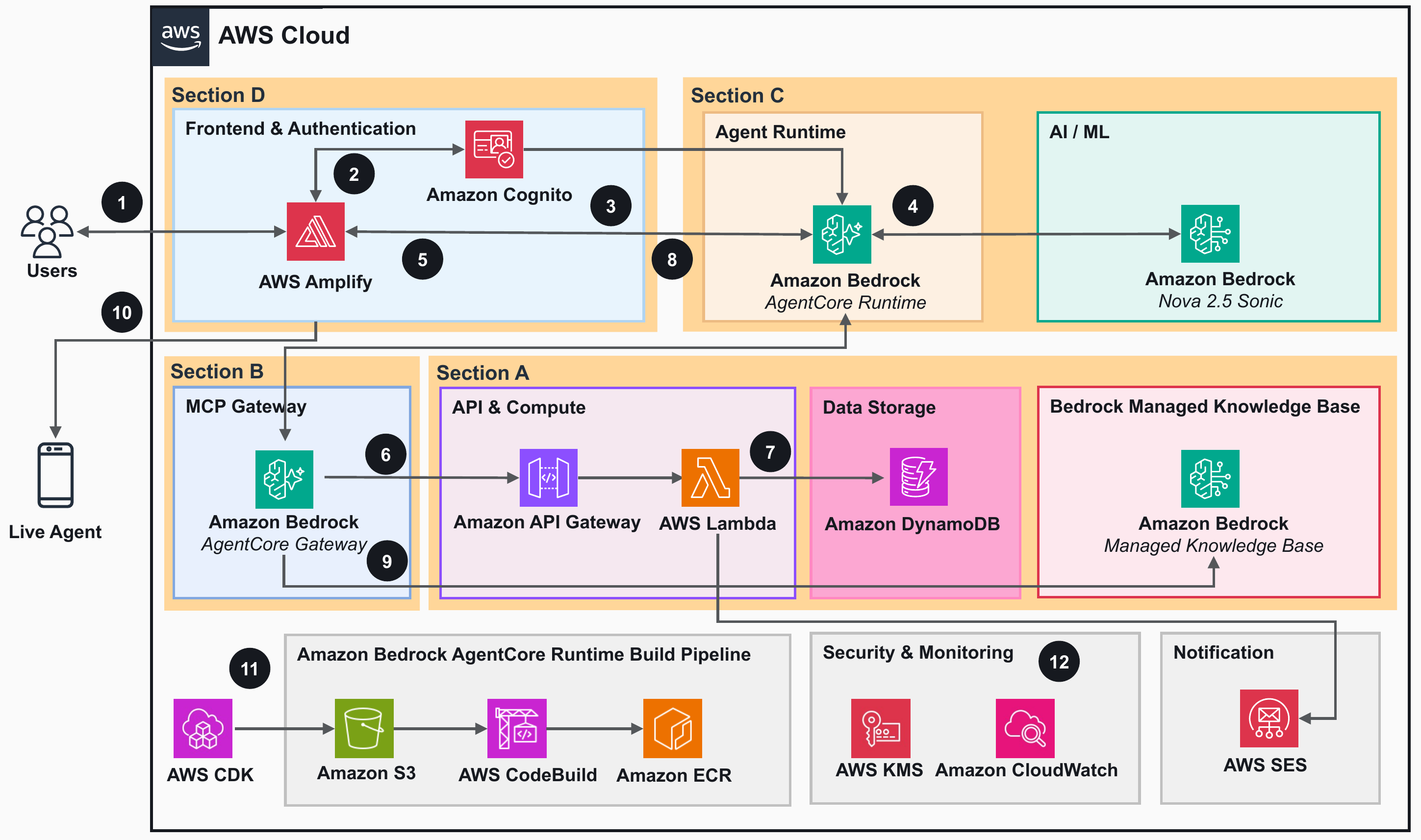
Figure 1: End-to-end architecture across the backend, the AgentCore Gateway, the AgentCore runtime, and the front end
Section A covers the backend infrastructure. Five CDK stacks deploy DynamoDB tables, Lambda functions, API Gateway endpoints, Amazon Bedrock Knowledge Bases, and Amazon Cognito.
Section B covers the AgentCore Gateway. One CDK stack creates the Amazon Bedrock AgentCore Gateway with the MCP protocol and exposes every backend endpoint as a tool the agent can call by name.
Section C covers the AgentCore runtime. Two CDK stacks provision the runtime infrastructure. Amazon Elastic Container Registry (Amazon ECR) stores the container image, Amazon Simple Storage Service (Amazon S3) holds source uploads, and AWS CodeBuild produces the ARM64 Docker image. The Amazon Bedrock AgentCore runtime runs with WebSocket support using Strands Agents framework with Amazon Nova 2.5 Sonic.
Section D covers the front end. One CDK stack deploys the React app on AWS Amplify.
User request flow
- The user opens the web application, hosted on AWS Amplify, in a browser or on a mobile device.
- The user enters their credentials on the login page. Amazon Cognito authenticates the request and returns JSON Web Tokens (JWTs) and temporary AWS credentials.
- The front end opens a SigV4-signed WebSocket connection to Amazon Bedrock AgentCore to begin the voice concierge session.
- The runtime validates the token with Amazon Cognito and initializes Amazon Nova 2.5 Sonic through Amazon Bedrock.
- The user speaks a request. Amazon Nova 2.5 Sonic processes the audio and triggers tool calls. The agent handles the tool integration by invoking the AgentCore Gateway using MCP to retrieve flight data, manage bookings, and update passenger preferences.
- The AgentCore Gateway forwards requests as REST API calls to Amazon API Gateway, which routes them to AWS Lambda functions.
- AWS Lambda functions query Amazon DynamoDB tables for bookings, passengers, seat maps, loyalty status, and flight information. Email notifications are sent through Amazon SES.
- Amazon Nova 2.5 Sonic generates a contextual voice response and streams it back to the user over the WebSocket connection through the AgentCore runtime.
- For a policy question, the AgentCore Gateway queries Amazon Bedrock Knowledge Bases directly through the MCP Knowledge Base connector. The knowledge base returns the relevant policy passages as citations to the agent.
- When the user requests a live agent, AWS Lambda logs the escalation in Amazon DynamoDB and returns a reference number. AWS Amplify then triggers the call from the user’s device to connect them to the live agent.
Build and operations
The next two steps sit outside the live conversation. They describe how the solution is built and how it runs day to day.
- AWS CDK deploys the solution with a single script. The build uploads the agent source to Amazon S3 and triggers AWS CodeBuild to produce the container image, which it stores in Amazon ECR for the AgentCore runtime.
- Amazon CloudWatch collects logs, metrics, and alerts across every service, and AWS Key Management Service (AWS KMS) encrypts data at rest.
Prerequisites
Before you begin, confirm that you have the following in place.
- An AWS account.
- Model access in Amazon Bedrock for Amazon Nova 2.5 Sonic in the AWS Region where you deploy. For model availability by Region, refer to Supported models by AWS Region in Amazon Bedrock. Amazon Bedrock Knowledge Bases uses a service-managed embedding model, so you do not need separate embedding model access.
- Node.js 20.x or later for AWS CDK and the Lambda functions.
- Python 3.12 or later for the data seeding and test client.
- AWS Command Line Interface (AWS CLI) 2.x configured with credentials.
- AWS CDK CLI 2.x installed with
npm install -g aws-cdk, and your account bootstrapped withnpx cdk bootstrap. - The accompanying code from the aws-samples GitHub repository.
Deploy the solution with AWS CDK
The solution deploys with a single CDK script. Clone the repository, configure your AWS credentials, and run the deployment script. For detailed deployment steps, see the README in the GitHub repository.
The sample airline data model
API Gateway publishes a REST API with IAM-authorized endpoints and Lambda integration. Amazon DynamoDB stores the sample airline data model with single-digit millisecond latency and on-demand scaling. The data covers customer profiles, bookings, passengers, seat maps, purchase history, preferences, conversation transcripts, and flight status.
Answering policy questions with a knowledge base
Travelers ask about baggage limits, change fees, pet travel, and loyalty terms. The solution answers those questions using Retrieval Augmented Generation (RAG) through Amazon Bedrock Knowledge Bases, grounding responses in your airline policy documents. The repository ships with sample policy documents for baggage, cancellation and refunds, change and rebooking, fare class rules, loyalty terms, pet travel, special assistance, and upgrades.
You upload your documents to Amazon S3 and create the knowledge base once. From there, Amazon Bedrock handles the rest, including embedding, chunking, indexing, storage, and retrieval. Storage runs on Amazon S3 Vectors, a capability of Amazon S3. Smart Parsing prepares source PDFs so tables and structured layouts retrieve accurately. When your policy documents change, you sync the knowledge base and the new content is available right away. There’s no pipeline to redeploy.
Connecting the knowledge base to the agent is direct through AgentCore Gateway. You add the knowledge base as a Connectors target and choose standard or agentic retrieval, and the Gateway exposes it as a named MCP tool alongside your backend API tools. The agent then discovers it at runtime and calls it by name, with no custom Lambda or retrieval code to write. For the setup steps, see Add a knowledge base as a gateway target.
To use your own policies, drop your PDF or text files into the policy documents folder and redeploy the knowledge base stack.
Voice AI processing with Amazon Bedrock AgentCore
Each session runs as a managed container on AgentCore runtime with microVM isolation, keeping travelers’ conversations separate under load. AgentCore provides automatic scaling, built-in monitoring, and session routing.
For production deployments, add Amazon Bedrock Guardrails to filter prompt-injection attempts and validate response grounding. The confirm-before-write pattern in this solution asks the traveler to confirm before making changes. That pattern, together with the knowledge base citations that trace answers back to source documents, already provides a baseline of responsible AI practice.
The agent uses the Strands BidiAgents framework to define the system prompt, the tools, and the conversation flow. Amazon Nova 2.5 Sonic brings the following capabilities to the concierge.
- Speech recognition across accents and robustness to background noise.
- Spoken responses that adapt to the traveler’s tone.
- Bidirectional streaming with low latency.
- Asynchronous tool calling that fetches data or makes tool calls in parallel without pausing the conversation.
- Latency masking that generates interim spoken responses while waiting for tool results, keeping the conversation natural.
- Barge-in and natural turn-taking.
- Context that carries across many turns.
Audio streams from the front end as 16 kHz PCM over the WebSocket to AgentCore runtime. Amazon Nova 2.5 Sonic transcribes the speech, the agent picks the right tools, and calls them through MCP. The AgentCore Gateway translates each MCP call into a REST request, Lambda runs the logic and returns results, and Amazon Nova 2.5 Sonic folds those results into a spoken reply.
What’s new in Amazon Nova 2.5 Sonic
This solution uses Amazon Nova 2.5 Sonic, a speech-to-speech model with strong reasoning for real-time voice. For a voice concierge that calls backend tools and follows a detailed system prompt, that reasoning shows up in a few practical ways:
Better tool calling and agentic task completion – The agent selects and chains the right tools reliably across multi-step requests, such as looking up an itinerary and then changing a seat in one conversation.
Strong instruction following and reasoning – The model adheres closely to the system prompt, including formatting rules like reading confirmation codes and flight numbers one character at a time.
Accurate responsible-AI handling – The model responds helpfully to genuine traveler requests while safely handling inappropriate ones.
User authentication
The solution uses Amazon Cognito User Pools and Identity Pools for role-based access. A traveler signs in with a username and password and receives JWTs, an access token and an ID token. The front end exchanges the ID token with the Cognito Identity Pool for temporary AWS credentials that consist of an access key, a secret key, and a session token. Those credentials sign the WebSocket connection to AgentCore runtime and the requests to API Gateway using Signature Version 4 (SigV4). Only authenticated travelers reach the application and the service APIs.
Authentication and WebSocket connection flow
The front end uses the temporary AWS credentials to open a SigV4-signed WebSocket connection to AgentCore runtime and sends the access token for identity verification. The browser then streams 16 kHz PCM audio and receives voice responses and tool notifications over the same connection. No server-side proxy sits in the middle.
The following figure shows the authentication and WebSocket connection sequence between the browser, Amazon Cognito, and the AgentCore runtime.
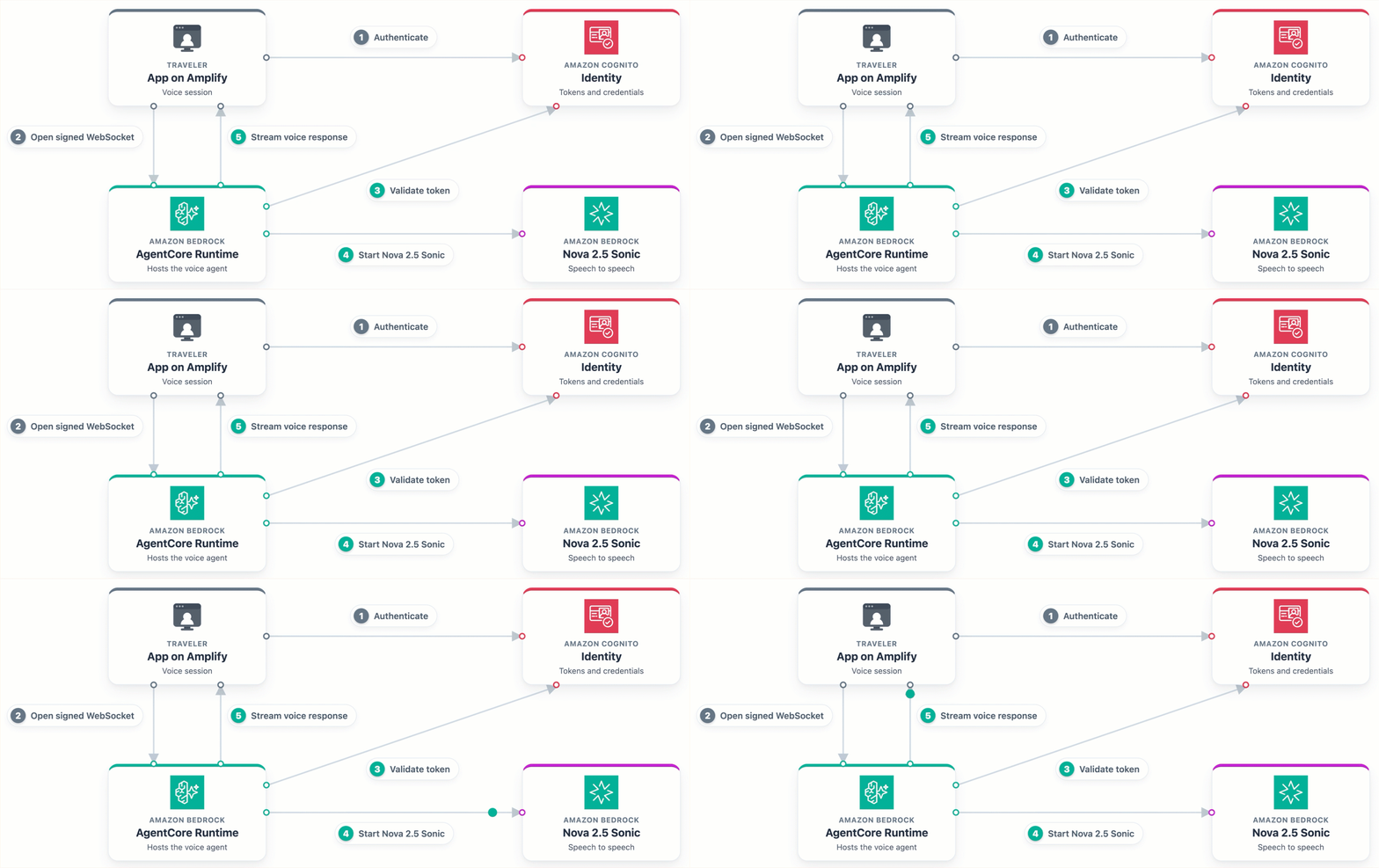
Figure 2: A traveler authenticates with Amazon Cognito, the browser opens a SigV4-signed WebSocket to AgentCore runtime, and Amazon Nova 2.5 Sonic streams voice both ways
Voice interaction and dynamic tool calling
A traveler asks to see their seats. Nova 2.5 Sonic transcribes the request and the agent selects the tools it needs. It calls them in parallel through the AgentCore Gateway using MCP, and the Gateway translates each call into a REST request to API Gateway. Lambda functions query DynamoDB and return the results, and Nova 2.5 Sonic streams a spoken response that blends everything together. Because the tool calls run asynchronously, the conversation doesn’t stall while data loads.
The following figure shows how the agent processes a spoken request and dynamically calls backend tools through the AgentCore Gateway:
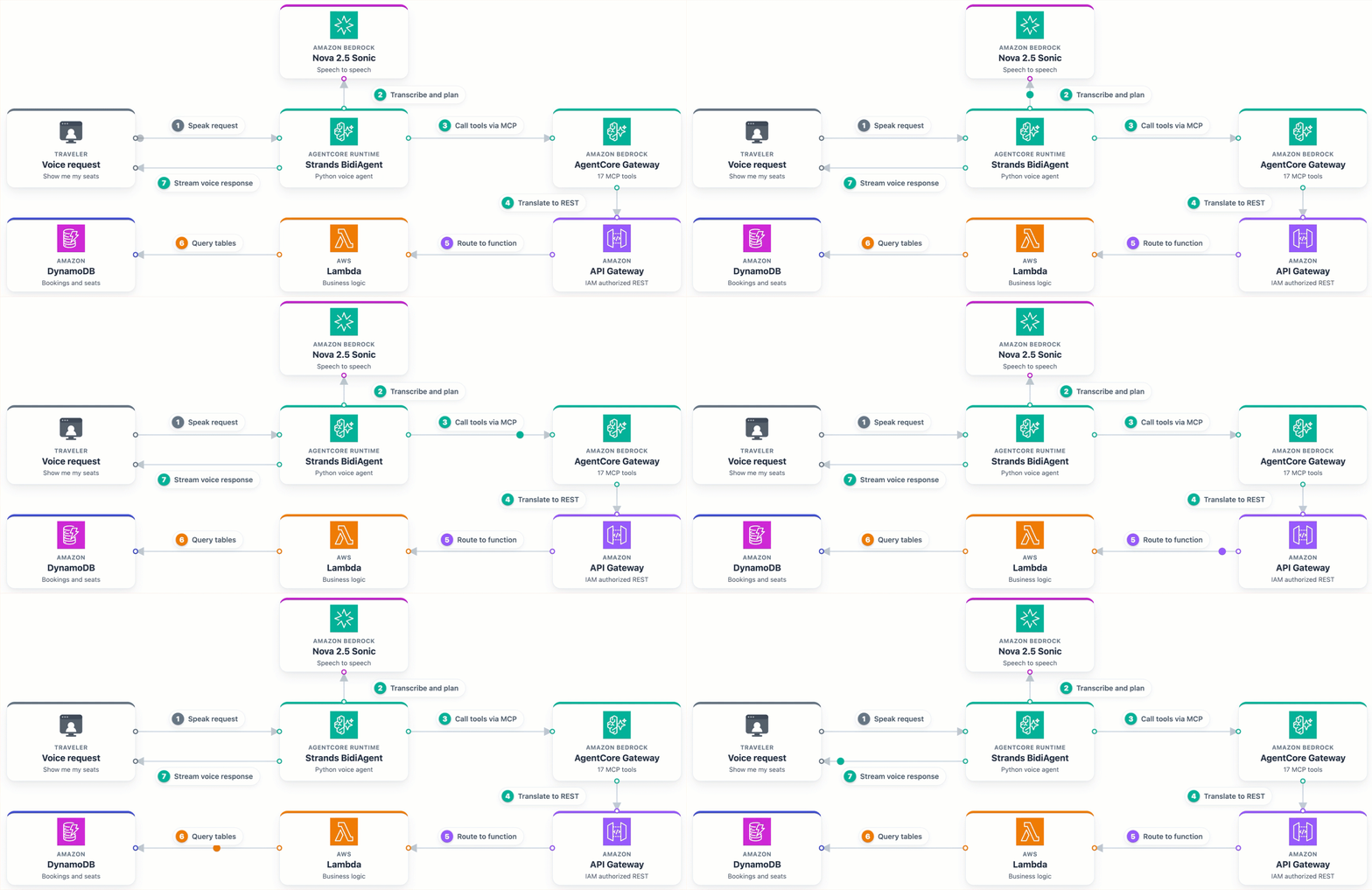
Figure 3: A spoken request travels through Nova 2.5 Sonic, the AgentCore Gateway, API Gateway, Lambda, and DynamoDB, and the voice response streams back
Answering a policy question from the knowledge base
When a traveler asks about the baggage policy, the agent reaches Amazon Bedrock Knowledge Bases through the AgentCore Gateway using its native connector. The knowledge base runs agentic retrieval with a managed reranker and returns relevant policy passages as citations. Nova 2.5 Sonic composes the answer and speaks it back to the traveler.
The following figure shows the agent answering a policy question by retrieving grounded passages from Amazon Bedrock Knowledge Bases:
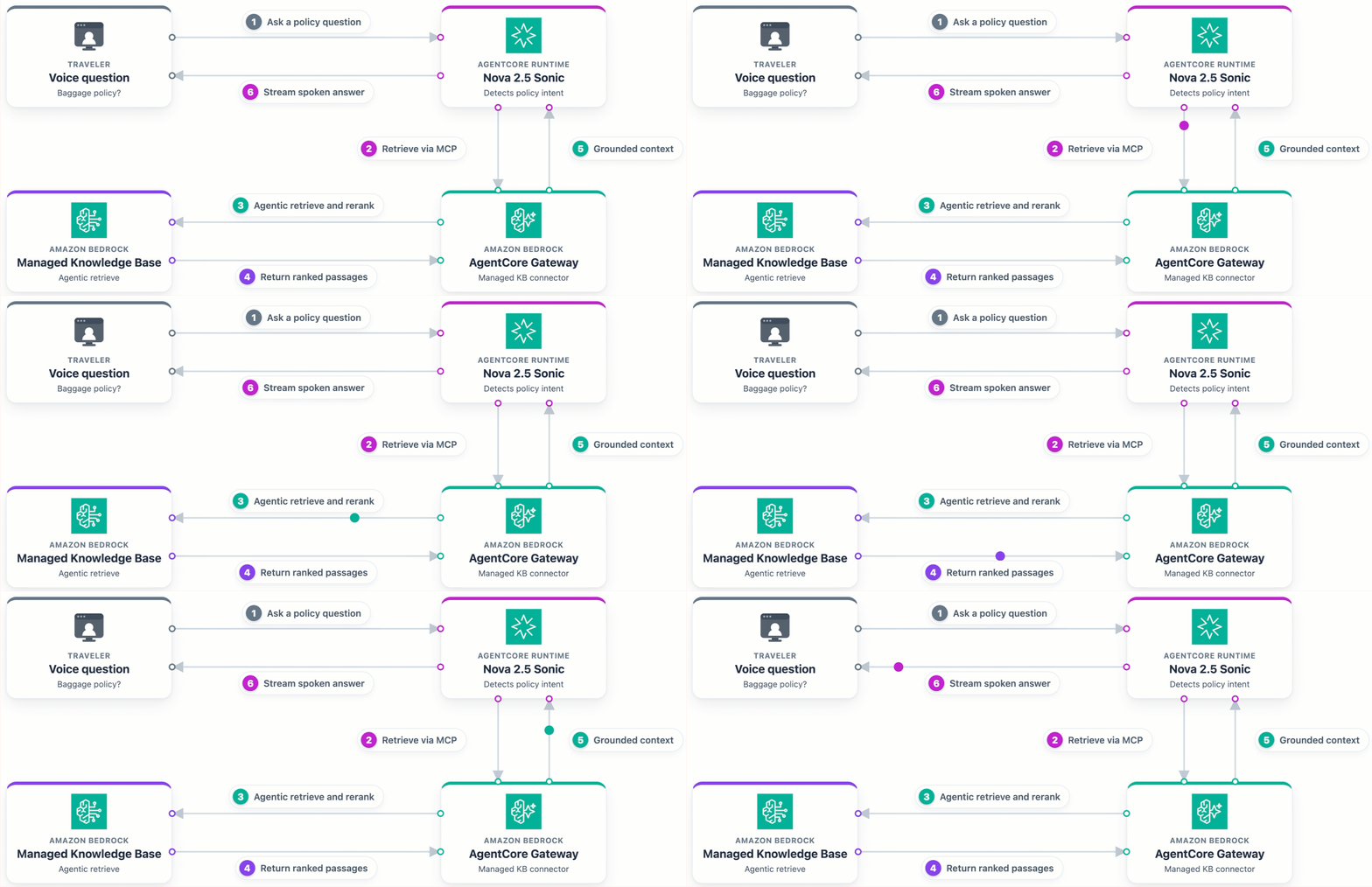
Figure 4: A policy question is answered by Amazon Bedrock Knowledge Bases and spoken back to the traveler
Escalating to a live agent
The concierge hands a traveler to a person when it cannot fulfill a request or when the traveler asks. After the traveler confirms, the agent calls the EscalateToAgent tool. Lambda records the escalation in DynamoDB and returns a reference number with an estimated wait time. The agent shares that reference number, and the Amplify front end places the call to the support line. This sample doesn’t include a contact center application, so connecting to a person depends on the support number you configure.
The following figure shows the escalation flow when a traveler requests a live agent:
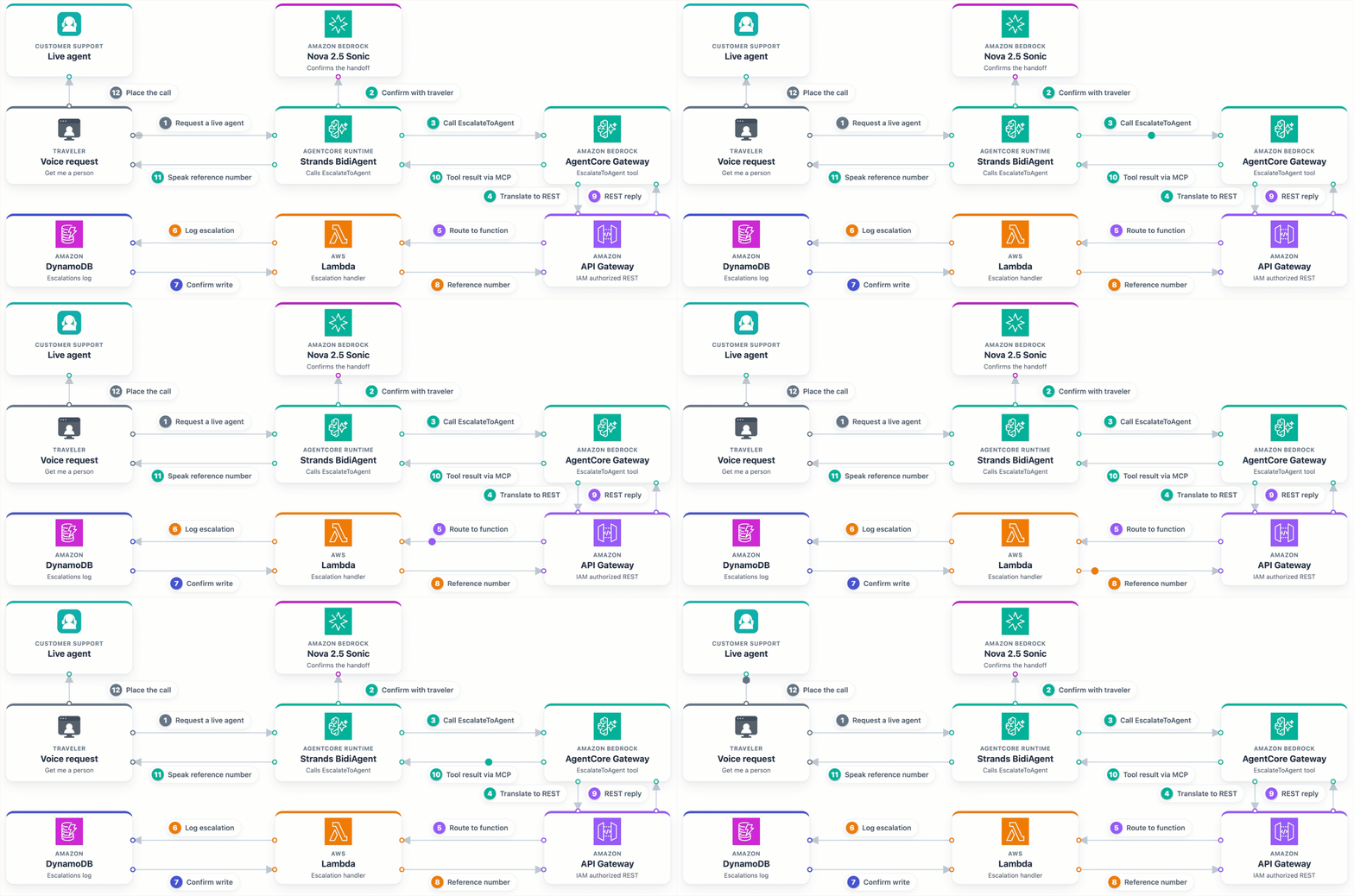
Figure 5: The agent logs the escalation in DynamoDB, shares a reference number, and the front end places the call to a live agent
Concierge walkthrough
Open the Amplify URL in your browser and sign in with the AppUser credentials. Choose the microphone button to start a voice conversation. The agent greets you by name and pulls up your itinerary in the background. From there you can speak naturally to change a seat, check a delay, review a policy, or reach a live agent. The following video shows a full session from greeting to escalation.
The whole conversation runs hands-free over a single WebSocket connection. The agent confirms every change before it writes. It speaks flight numbers one character at a time, so they’re clear to hear, and it calls backend tools in the background so there are no noticeable delays.
Clean up
To stop incurring charges, remove the deployed resources. Preview the deletions first, then run the cleanup.
./cleanup-all.sh --dry-run
./cleanup-all.sh
The script destroys resources in reverse order, starting with the front end, then the AgentCore runtime, the AgentCore Gateway, and the backend infrastructure.
Conclusion
This post showed you how to build a voice travel concierge on AWS. It uses Amazon Cognito for authentication, Amazon Bedrock AgentCore for agent hosting, API Gateway and Lambda for business logic, DynamoDB for storage, and Amazon Bedrock Knowledge Bases for policy answers. The layered design separates the front end, the agent, and the backend so each one develops and scales on its own. The concierge manages itineraries, seat changes, meal preferences, flight status, loyalty questions, policy lookups, and live agent escalation through MCP tools. Amazon Nova 2.5 Sonic brings low-latency voice, parallel tool calling, and natural interruption handling. Pay-per-use pricing and automatic scaling keep costs in step with traffic, and with MCP integration you can add a new Lambda function without touching agent code. To get started, visit the solution repository on GitHub and adapt it to your own airline systems.
Additional resources
- Using the Amazon Nova Sonic Speech-to-Speech model
- Getting started with Amazon Bedrock AgentCore
- Model Context Protocol specification
- Amazon Bedrock Knowledge Bases
About the authors

Ravi Kumar
Ravi is a Senior Technical Account Manager in AWS Enterprise Support who helps customers in the travel and hospitality industry to streamline their cloud operations on AWS. He is a results-driven IT professional with over 20 years of experience. Ravi is passionate about generative AI and actively explores its applications in cloud computing. Outside of work, Ravi enjoys creative activities like painting. He also likes playing cricket and traveling to new places.

Salman Ahmed
Salman is a Senior Technical Account Manager at AWS. He specializes in guiding customers through the design, implementation, and support of AWS solutions. Combining his networking expertise with a drive to explore new technologies, he helps organizations successfully navigate their cloud journey. Outside of work, he enjoys photography, traveling, and watching his favorite sports teams.

Sergio Barraza
Sergio is a Senior Technical Account Manager at AWS, helping customers design and optimize cloud solutions. With more than 25 years in software development, he guides customers through AWS services adoption. Outside work, Sergio is a multi-instrument musician playing guitar, piano, and drums, and he also practices Wing Chun Kung Fu.

Ankush Goyal
Ankush is a Senior Technical Account Manager at AWS who helps customers optimize their cloud architecture and operations. He works closely with enterprise customers to design scalable, resilient solutions on AWS. Ankush is focused on generative AI and enjoys helping teams put new technology to practical use. Outside of work, he enjoys spending time with family and exploring the outdoors.
来源:AWS Machine Learning Blog · aws.amazon.com