如何在 AgentCore 与 OpenClaw 上构建具备上下文记忆的 AI 助手
Building a context-aware AI assistant on AgentCore and OpenClaw
AWS 官方博客介绍如何在 Amazon Bedrock AgentCore 运行时上运行开源智能体系统 OpenClaw,构建能跨会话积累上下文的个人助手。方案用 AgentCore memory 的短期事件与长期抽取两层结构,配置 USER_PREFERENCE、SEMANTIC、SUMMARIZATION 三种抽取策略,并按用户 chat ID 划分命名空间隔离记忆。
原文给出可复用的 AgentCore 记忆架构与提示词缓存排序方法,读者可据此搭建带长期记忆的智能体。
Off-the-shelf AI assistants answer individual questions well, but they fall short on a different axis: continuity. Ask a stateless assistant about your garden today and it has no idea that you mentioned your fast-draining raised beds three weeks ago, that you only use organic fertilizer, or that your petunias were struggling through a heat wave. Every conversation starts from zero, and the burden of re-explaining context falls on the user.
The problem isn’t the quality of the answers, but that the assistant has no memory of you. This post shows how to build a personal assistant that accumulates context using OpenClaw, an open source agentic system, running on AgentCore runtime, a capability of Amazon Bedrock AgentCore. AgentCore memory, a capability of Amazon Bedrock AgentCore, turns disposable chats into durable knowledge. You will also see how to tag those memories with structured metadata to retrieve records that matter for the question at hand.
Our running example is Sprout, a gardening assistant, but the architecture is domain-agnostic. Swap the persona and the skills manifest, and the same pipeline serves a support bot, a fitness coach, or an internal help desk. The entire system lives in a single AWS CloudFormation template, deploys with one command, and runs on a consumption-based model that costs a few dollars a month for light personal use. Along the way, we share design guidelines you can apply to assistants you build on this stack.
Solution overview
AgentCore is a platform to build, connect, and optimize agents at scale, with any framework or model. The following diagram shows the end-to-end request flow, from an inbound Telegram webhook through the AgentCore runtime, and its supporting AWS services.

Figure 1: Telegram webhooks and Amazon EventBridge schedules both invoke the same AgentCore runtime agent, which coordinates the OpenClaw gateway, AgentCore memory, and Amazon Bedrock
Two entry points converge on one agent. Telegram messages arrive through Amazon API Gateway and a webhook AWS Lambda function, while scheduled jobs such as morning watering reminders arrive through Amazon EventBridge Scheduler and a cronjob Lambda function. Both call the InvokeAgentRuntime API on the AgentCore runtime, where a thin server.py process coordinates the OpenClaw gateway, AgentCore memory, and the Amazon Bedrock Converse API. Amazon Simple Storage Service (Amazon S3) provides workspace storage, AWS Key Management Service (AWS KMS) handles encryption, AWS Secrets Manager holds the bot token, and Amazon CloudWatch captures logs and metrics.
Prerequisites
To deploy your own version using the Launch Stack button or scripts/deploy.sh (described in the Grow your own section), you will need:
- Amazon Bedrock AgentCore access, including AgentCore runtime and AgentCore memory.
- Model access granted for the models you plan to route to: Claude Haiku 4.5 for text and Claude Sonnet 4.5 for vision (or the equivalents available in your account).
- Docker with
linux/arm64build support, plus the AWS Command Line Interface (AWS CLI) configured. This is needed only if you plan to build and push your own image. - A Telegram bot token (from BotFather) to serve as the assistant’s front door.
- Basic familiarity with agent orchestration concepts and CloudFormation.
The architecture: A serverless agent on AgentCore runtime
Every component lives in a single CloudFormation template, and no build tooling is required to launch. The following sections walk through the load-bearing decisions.
AgentCore runtime: Pay only for active compute
The agent lives in a container on AgentCore runtime, which uses consumption-based pricing. You’re billed for the compute your agent actively consumes, not for wall-clock uptime, and you don’t pay for the time when waiting for I/O such as model response. For a personal assistant used in short bursts, that is the difference between an approximately $1–2/month baseline and an approximately $35/month always-on Amazon Elastic Compute Cloud (Amazon EC2) instance. These figures are estimates for light personal use as of July 2026. Refer to AgentCore pricing for current rates.
The runtime enforces a minimal container contract: listen on port 8080, and expose GET /ping for health and POST /invocations as the agent entry point. Our container is linux/arm64, built multi-stage from the official OpenClaw image plus a Python layer.
OpenClaw as the agent substrate
OpenClaw provides the agent loop, tool use, and a skills system. It runs a wrapper (server.py) that adapts it to AgentCore HTTP protocol contract:
- On container start,
server.pylaunchesopenclaw gateway runas a subprocess and health-checks it. GET /pingreturns healthy quickly, so the AgentCore readiness probe passes.POST /invocationsdoes the real work: parse the payload, retrieve memory, assemble context, forward the turn to the gateway, and persist the result. One callout: AgentCore can thaw a frozen container whose subprocess has exited. So invocation path doesn’t assume the gateway is alive, it calls anensure_openclaw_ready()helper that re-checks health (and restarts the gateway if needed) before forwarding the turn.
This wrapper pattern generalizes to other use cases. Any agent framework that runs as a local process can be adapted to the AgentCore runtime the same way, without modifying the framework itself.
Two models, routed by task
Text chat and image understanding have different cost and quality tradeoffs, so the assistant routes them to different Claude models on Bedrock:
- Claude Haiku 4.5 for text: Fast and cheap for the high-volume conversational turns that dominate daily use.
- Claude Sonnet 4.5 for vision: Stronger multimodal reasoning for the less frequent but harder task of diagnosing a plant from a photo.
Text turns flow through the OpenClaw gateway, which brings skills and session state. Image turns call the large language model (LLM) from Bedrock directly from server.py, passing the image bytes as multimodal content blocks. We route images around the gateway deliberately: the in-container OpenClaw build dropped the image_url content parts before they reached Bedrock, so calling the Converse API directly from server.py makes sure the model sees the actual pixels. Both paths share the same system prompt (persona plus memory), so the experience stays consistent.
The model IDs are environment variables (MODEL_ID, VISION_MODEL_ID), so you can swap models per deployment without rebuilding the image.
Skills as the reusable capability unit
Capabilities are declared as skills in a community-skills.json manifest. A deploy-time script materializes them into the container and registers them in the OpenClaw config before the image is built. Sprout ships with weather, reminders, and plant notes skills at the time of publishing this post. Swap the manifest and the same pipeline serves a different domain. This is what makes the whole thing a reusable pattern and not only one bot.
Telegram as the serverless front door
Telegram is a practical channel for a personal assistant since it’s webhook-based, and it keeps everything serverless. It requires no client development, works on every device the user already owns, and supports text, images, and rich formatting through a straightforward bot API. BotFather issues a bot token, which is stored in Secrets Manager. The deployment registers a webhook that points Telegram at the API gateway endpoint. When the user sends a message, Telegram delivers it to the webhook Lambda function to validate the payload and call InvokeAgentRuntime. The reply travels back through the telegram bot API.
One formatting lesson to note: Telegram’s legacy markdown model is unforgiving about unescaped characters and a single stray underscore in a model response can make the whole message fail to send. Rendering replies as HTML is reliable so the assistant converts model output to Telegram-safe HTML before sending.
Memory: Turning disposable chats into durable knowledge
The architecture described so far is a capable, cheap, serverless agent, but on its own it still forgets you between conversations. Memory is what changes that. Imagine mentioning weeks ago that you garden organically, and today the assistant recommends a treatment and adds, on its own, that it picked the organic option because you don’t use synthetic fertilizer. A stateless model can’t do that.
The mental model: Short-term events, long-term extraction
AgentCore memory has two layers. Short-term memory stores every conversation turn as an event through CreateEvent, keyed by actorId (the Telegram chat ID) and sessionId. This is the raw transcript. Long-term memory is produced asynchronously by managed extraction strategies into durable, structured records. We configured three strategies:
USER_PREFERENCE: explicit choices the gardener stated (“I only use organic fertilizer”).SEMANTIC: inferred facts (“grows Mexican petunias in a Corten steel raised bed”).SUMMARIZATION: episodic session summaries (“discussed yellowing lower leaves during a heat wave”).
Namespaces: One garden per gardener
Sprout files records into per-user namespaces, so no two chats ever mix:
sprout/{chat_id}/long_term: preferences and semantic facts.sprout/{chat_id}/episodic/{session_id}: session summaries.
The chat ID is the only variable segment, which makes isolation straightforward to reason about and to test: each unique gardener maps to exactly one namespace, and no two gardeners collide.
The retrieval, assembly, and injection pipeline
On every turn, the agent retrieves the relevant long-term records, ranks them, and injects them into the system prompt. Here is what happens on every single message, inside server.py:
- Retrieve. Call
RetrieveMemoryRecordsagainstsprout/{chat_id}/long_term, using the user’s message as the search query, capped at 50 results, under a 3-second budget. If retrieval times out or errors, we degrade gracefully and answer without memory rather than failing.
try:
    records = memory_client.retrieve_memory_records(
        memoryId=MEMORY_ID,
        namespace=f'sprout/{chat_id}/long_term',
        searchCriteria={
            'searchQuery': user_message,
            'topK': 50,
            'metadataFilters': []
        },
    )  # 3s timeout
except Exception:
    records = []  # fall back to answering without memory
Snippet 1: Retrieving long-term records for the current turn (representative. See the repo for full source).
Assemble function adds additional custom logic. We want the explicit preferences to rank ahead of inferred facts, order is stable within each class, and the result is capped before injection:
def assemble(records, cap=50):
    explicit = [r for r in records if r.type == 'USER_PREFERENCE']
    inferred = [r for r in records if r.type != 'USER_PREFERENCE']
    # explicit beats inferred; stable order within each class
    ordered = explicit + inferred
    return ordered[:cap]
Snippet 2: The assembly step ranks explicit preferences before inferred facts.
Metadata: Subgrouping memories inside a namespace
Namespaces answer whose memory a record is, but metadata answers what it’s about. Inside sprout/{chat_id}/long_term, a semantic search for “my petunias are wilting”, would return everything that is close in meaning. For a gardener, that means a fertilizer preference from March, and a fig tree pruning note are ranked alongside records that actually matter. And structured metadata helps us narrow down the scope of memories before it reaches the prompt.
One rule shapes every decision here. A metadata key is only filterable server-side if you declare it as an indexed key. You can read more in Structured memory filtering with metadata in Amazon Bedrock AgentCore Memory. In this case, sprout uses three indexed keys:
IndexedKeys:  # on the AWS::BedrockAgentCore::Memory resource
  - Key: type  # seperate the kinds of records
    Type: STRING
  - Key: section  # which bed or area it describes
    Type: STRING
  - Key: plants  # what is growing there
    Type: STRINGLIST
Each entry names a key, which must match an indexed key to be filterable, and sets extractionType to either STRICTLY_CONSISTENT, passed through from the event, or LLM_INFERRED, extracted from the conversation. For inferred keys, an extraction configuration can restrict values to a fixed list. Sprout does that exactly, so both write paths would create the same vocabulary and a filter means the same thing regardless of which part created the record.
Persisting the turn and closing the loop
After the model responds, server.py calls CreateEvent with both the user turn and the assistant turn. That new event feeds the extraction strategies, which enrich the long-term store for next time.
memory.create_event(
    memoryId=MEMORY_ID,
    actorId=chat_id,
    sessionId=session_id,
    payload=[
        {'role': 'user', 'content': user_message},
        {'role': 'assistant', 'content': reply},
    ],
)  # feeds USER_PREFERENCE / SEMANTIC / SUMMARIZATION extraction; errors are logged, never fatal
Snippet 3: Persisting the turn so the extraction strategies can enrich long-term memory asynchronously.
Extraction is asynchronous, so a fact mentioned in this session typically becomes retrievable in a later one. Design for that delay: short-term session events cover the current conversation, and long-term records cover everything before it.
Putting it together: A personalized watering plan
Here is where the full pipeline works end-to-end. Over a few conversations you catalog your whole garden, one plant at a time, in plain language. Each mention becomes an event. The extraction strategies extract information about the plant, its location, and its sun exposure into sprout/{chat_id}/long_term. This morning the user asks a question, “Do you remember the other plants in my garden?” Retrieval pulls the records back, assembly ranks them, and they ride into the system prompt. The assistant answers with the user’s location, sun exposure, bed construction, soil behavior, and plant inventory, none of which appeared in the message itself.
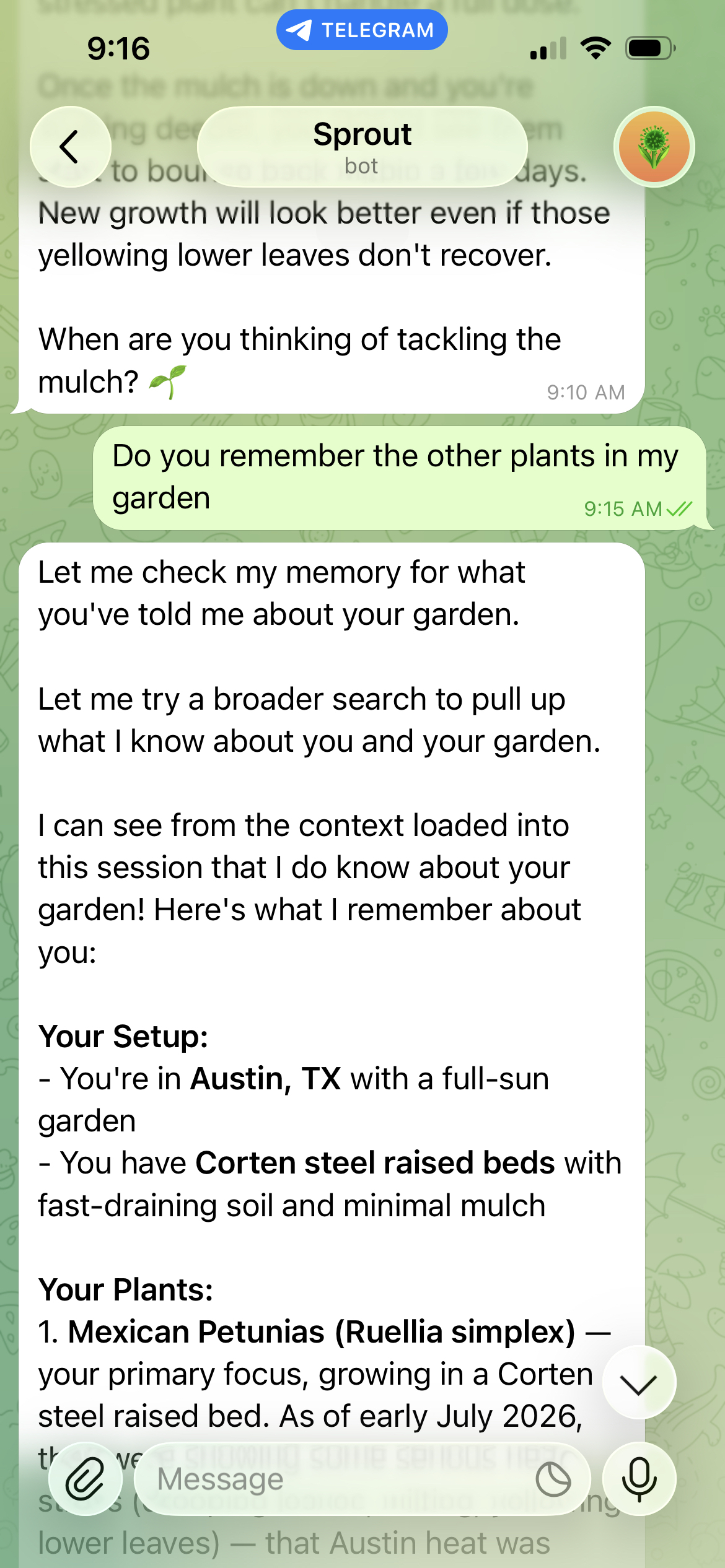
Figure 2: Sprout answers a question about the garden by recalling the stored plant inventory and growing conditions
Using the scheduler skill on the Amazon EventBridge → Cron path, Sprout can also turn that plan into proactive reminders (“skip the herbs, the soil is still damp from yesterday”) and adjusts them against the weather skill when rain or a heat wave is coming.
Memory and vision also compound each other. When the user sends a photo of a wilting plant, the image goes to Claude Sonnet 4.5 while the system prompt still carries everything the memory layer knows. The assistant matches the photo to the Mexican petunias already in the user’s saved inventory and diagnoses wilt stress in context rather than analyzing an anonymous plant photo cold.
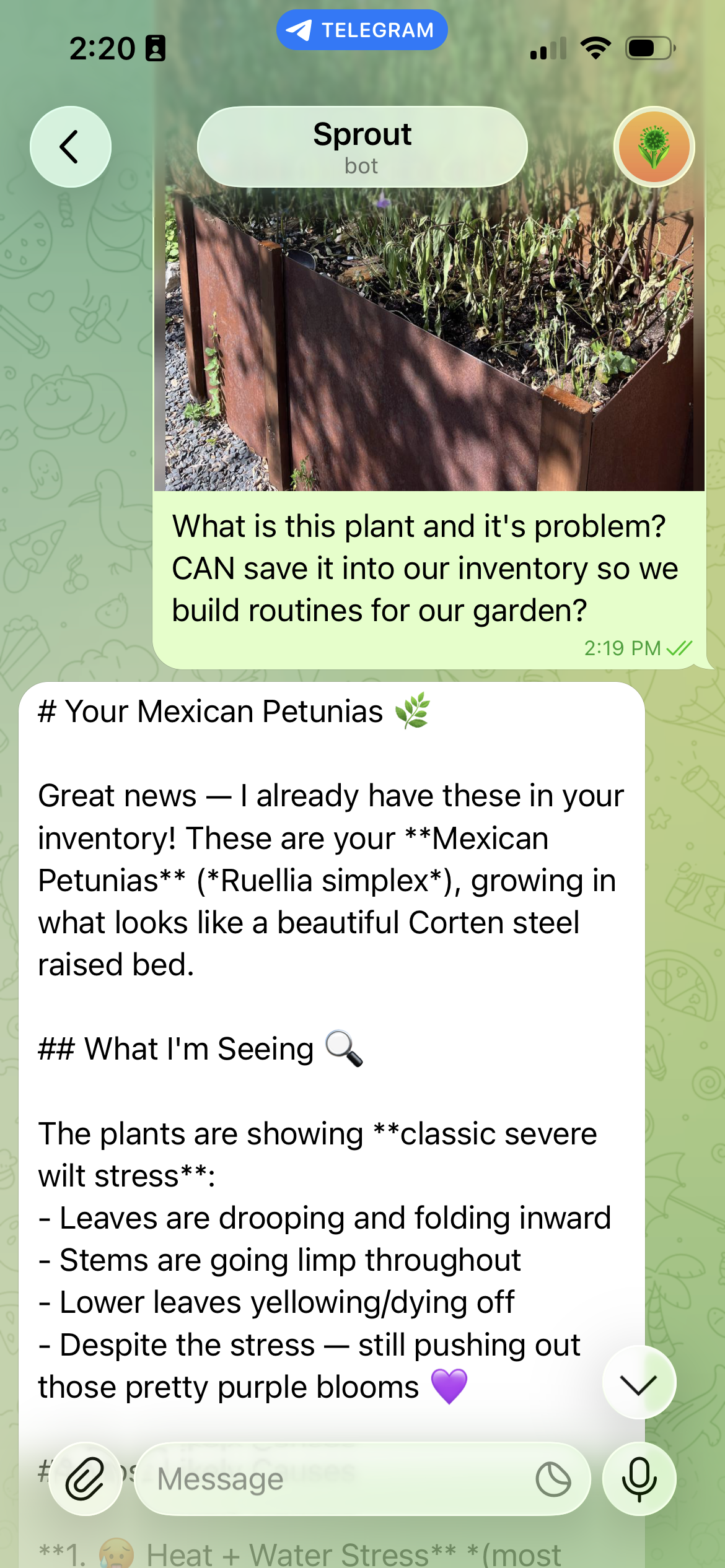
Figure 3: Vision and memory working together. The photo goes to the vision model while the system prompt carries the user’s stored garden context
Vision models aren’t infallible. In an earlier exchange without the inventory context, the same plant was confidently identified as a morning glory, a species with similar trumpet-shaped purple flowers. Grounding the vision model with the user’s own stored inventory is what turned a plausible-sounding guess into a correct, personalized diagnosis, and it is a good illustration of why memory improves accuracy and not only tone.
Keeping inference costs low with prompt caching
Injecting memory into every turn makes the system prompt large, and a naive implementation would pay for those tokens on every request. Prompt caching on Amazon Bedrock addresses this. The assistant structures its prompt so that the stable prefix, the persona and the assembled memory block, comes first and the volatile user message comes last. Bedrock caches the processed prefix across requests, so repeated turns within a conversation skip recompute of the unchanged portion. Prompt caching can reduce costs by up to 90 percent and latency by up to 85 percent for supported models.
The ordering rule matters more than any single setting: put stable content first, volatile content last, and keep the memory block’s internal ordering deterministic (which the preceding assembly function facilitates) so the prefix actually matches between requests.
Design guidelines to build on AgentCore and OpenClaw
Sprout is one assistant, but the decisions behind it generalize. If you’re building your own assistant on this stack, the following guidelines are the ones we would carry to any domain.
- Wrap, don’t fork. Adapt your agent framework to the AgentCore container contract with a thin HTTP wrapper rather than modifying the framework. The contract is small, port 8080 with
/pingand/invocations, and a wrapper keeps you on the framework’s upgrade path. - Design namespaces before you store anything. Memory namespaces are your isolation boundary. Make the user ID the only variable segment, and choose it from a channel-native ID you already trust, such as the chat ID. Multi-tenant designs get audits and deletion requests eventually. A clean namespace scheme makes both trivial.
- Treat memory as an enhancement, never a dependency. Every memory operation should be allowed to fail gracefully. Retrieval failures should produce a memoryless answer without blocking the reply. Users forgive a forgetful turn far more readily than a failed one.
- Route models by task. Use a fast, cost-effective model for high-volume text and reserve a stronger multimodal model for the turns that need it. Keep model IDs in environment variables so routing changes are configuration, not code.
- Order prompts for the cache. Stable persona and memory first, volatile user input last, deterministic ordering throughout. This one structural habit is where most of the inference savings come from.
- Plan for extraction latency. Long-term memory is extracted asynchronously, so don’t promise same-session recall of new facts. Let short-term session events cover the current conversation and long-term records cover prior ones.
- Put a budget on it from day one. A consumption-based agent is inexpensive until a retry loop or a chatty user makes it otherwise. An AWS Budgets alert at 80 percent and 100 percent of a monthly cap costs nothing and catches surprises early.
- Keep skills small and single-purpose. A skill should do one thing a user would name in a sentence, such as check the weather or set a reminder. Small skills are independently testable, independently swappable, and easy for the model to select correctly. A do-everything skill forces the model to guess which of its behaviors you meant.
Grow your own
Two ways to plant it, same garden:
- Single-step Launch Stack: the CloudFormation template points at a public Amazon Elastic Container Registry (Amazon ECR) image, so it deploys nothing but a Telegram bot token.
- Build your own: The scripts/
deploy.shscript validates the template, builds and pushes your own ARM64 image to your private Amazon ECR repository, deploys the stack, and registers the Telegram webhook, for a fully customizable build.
Light personal use runs about $5–9/month as of July 2026 (roughly $2 infrastructure, $1–3 Haiku text, $2 Sonnet vision), with a built-in AWS Budget that alerts at 80 percent and 100 percent of a cap you set.
The full source code is available in the sample-agentcore-memory-openclaw GitHub repository.
Clean up
When you are done experimenting, tear everything down to avoid ongoing charges. Because the whole system is one CloudFormation stack, cleanup is mostly a single delete:
- Delete the CloudFormation stack. This removes the AgentCore runtime agent, API Gateway, the Lambda functions, the Amazon EventBridge schedule, and the associated AWS Identity and Access Management (IAM) roles.
- Delete the AgentCore memory store (and its namespaces) so no user records are retained.
- Delete any images you pushed to your private ECR repository, and the repository itself if it’s no longer needed.
- Remove the AWS Budget alert if you created one outside the stack.
- Revoke Telegram’s webhook (or delete the bot through BotFather), and revoke Bedrock model access if you no longer need it.
Conclusion
The reusable core of this solution is a serverless agent on Amazon Bedrock AgentCore with a skills system and managed memory. AgentCore memory removes the need to build custom vector stores and extraction pipelines while leaving you full control over what the agent remembers and forgets, consumption-based compute plus prompt caching keeps a genuinely personalized assistant at a few dollars a month, and the OpenClaw skills manifest makes the whole pattern portable across domains. Personalization also compounds: the more a user interacts, the more useful the assistant becomes.
To go further, start with a single domain such as watering reminders and expand memory scope incrementally, explore episodic memory so the agent can reference specific past conversations (“last time we discussed the fig tree, you decided to hold off on fertilizer”), or fork the repository, swap in your own persona and skills, and grow whatever assistant you need.
To learn more, refer to the AgentCore documentation. The following related posts cover the building blocks in more depth:
- Amazon Bedrock AgentCore memory: Building context-aware agents
- Building smarter AI agents: AgentCore long-term memory deep dive
- Effectively use prompt caching on Amazon Bedrock
- Securely launch and scale your agents and tools on Amazon Bedrock AgentCore runtime
About the authors

Thiago Verney
Thiago is a Front-End Engineer on the One MHS team at Amazon, specializing in AI-powered interfaces using React, TypeScript, and modern federated microfrontend architecture. He builds user-focused interfaces for operations-leader in FC, drawing on prior work on the Amazon Q Developer (now Kiro) team at AWS. He is passionate about innovation and crafting pragmatic solutions to solve real user problems. In his spare time, he enjoys gardening, traveling, and picking up hobbies with his wife in Austin, TX.

Sathya Balakrishnan
Sathya is a Pr. Cloud Architect in the Professional Services team at Amazon Web Services (AWS), specializing in data and machine learning (ML) solutions. He works with US federal financial clients. He is passionate about building pragmatic solutions to solve customers’ business problems. In his spare time, he enjoys watching movies and hiking with his family.

Akarsha Sehwag
Akarsha is a Sr. Gen AI Data Scientist for Amazon Bedrock AgentCore GTM team. With over 7 years of expertise in AI/ML, she has built production-ready enterprise solutions across diverse customer segments in Generative AI, Deep Learning and Computer Vision domains. Outside of work, she likes to hike, bike and play Badminton.
来源:AWS Machine Learning Blog · aws.amazon.com